web

Tags

Follow from the Fediverse

Follow #web from Mastodon or any other Fediverse app and its public posts arrive in your timeline. No vutuv account needed.

@web@tags.vutuv.de

Your address is used once, to send you to your own server's follow dialog. It is never stored here.

The most endorsed users with this tag

Posts with this tag

13 posts

Filters
Aral Balkan @aral mastodon.ar.al

🥳 New Kitten release

• Adds Features (plugins) support.

kitten.small-web.org

Features are what we call plugins on the Small Web. Your Small Web app, and the data on it, is yours (it’s in a place you own and control) but it would be nice if others could extend what you app can do by creating features for it that you can choose to install if you trust that person/group.

Every section in Meow (codeberg.org/project-meow/…), for example, is being implemented as a feature.

(In a future update, you will gain the ability to install third-party features from git repositories (hosted on your or other people’s Small Web places).

In technical terms, you can now add folders to your routing structure at runtime (in main.script.js) via the new addRoutes() function that’s injected into your default export. Routes added this way share the same route order and root as your main app.

Full change log: codeberg.org/kitten/…
Reference docs: kitten.small-web.org/reference/…

Enjoy!

💕

Kitten SmallWeb SmallTech web dev
Aral Balkan @aral mastodon.ar.al

🥳 New Kitten Release

Multiple bug fixes, including a Small Web Protocol regression fix (apps can once again create their own routes under /💕/) and correct handling of projects that use a src/ folder.

kitten.small-web.org

Please see the change log entry for full details:
codeberg.org/kitten/…

Kitten KittenRelease SmallWeb SmallTech web dev
Screenshot of Kitten running in terminal. The prompt shows the folder ~/Projects/kitten/app on git branch main, and the command “kitten --version” has been run.

Below it is an illustration of a cute grey-and-white cartoon kitten sitting on a green hill against a blue sky.

The output reads:

Kitten
by Aral Balkan, Small Technology Foundation

Version: 1-d2194b-24.22.2-20261119102405
Born: 2026/11/19 at 10:24:05 UTC (Scorpio)
Fav. colour: #d2194b, followed by a swatch of that crimson colour
API version: 1
Runtime: Node.js 24.22.2

A callout reads: “Like this? Fund us! We’re a tiny, independent not-for-profit. https://small-tech.org/fund-us”

Need help? Tutorials • Reference • Issues
Aral Balkan @aral mastodon.ar.al

🥳 New Kitten web site release!

The Kitten web site now has full-text search.

kitten.small-web.org

Written, of course, in Kitten.

The index is created lazily on the server in ~0.3 seconds (on my machine) the first time a route is requested after a server restart.

During dev, it’s fast enough that you don’t feel it during hot reloads :)

For the geeks among you, the search features Porter stemming (via the stemmer package), prefix matching on the last query term (which you can see in action in the screenshot), Damerau–Levenshtein distance (so we’re forgiving of little typos), as well as a few code-related optimisations like decomposing camelCase compounds (so WebSocket also matches “web” and ”socket”), etc.

(Oh yeah, and it uses the nifty new baseline URL text fragments feature¹ to have the browser take you straight to the search term in the body of the text.)

Enjoy!

💕

¹ developer.mozilla.org/en-US/…

SmallWeb SmallTech Kitten web dev
+5 Less NodeJS JavaScript HTML CSS peerToPeerWeb
Screenshot of the new full-text search bar in Kitten showing 60 results for “streaming ht” with “Streaming HTML” as well “HTML” highlighted in the responses, the top two being the Streaming HTML tutorial and the Streaming HTML section under Reference > HTML.
Aral Balkan @aral mastodon.ar.al

🥳 New Kitten release!

• Event routing within nested components is now more intuitive and logical.

e.g., a button on a form that was written into the slot of a layout component by a page. In this case, the event is routed to the page first, since the form was written into the slot by the page, whereas, previously, it would have been routed to the layout component.

Also, if the initial target doesn’t implement a handler for it, the event is now also delivered to the component around the element (in this case, the layout) and any other ancestors it might have.

• Components that update() themselves now retain the props and slot content from their last render. Again, this just means they work as they should now.

• Markdown pages now get linked anchor headings by default and you can turn the feature on for your own Markdown blocks in JavaScript pages by including the new headling-links attribute in your <markdown> tags in Kitten’s tagged template strings. e.g., kitten.html<markdown heading-links>…</markdown>

• New preserve attribute lets DOM elements opt out of morphs (e.g., when you want to retain the text entered into a text-field while morphing the rest of the page using Kitten’s Streaming HTML workflow).

• Miscellaneous bug fixes and improvements.

See the change log for the full list of changes including illustrative code samples:

codeberg.org/kitten/…

Also, I’ve reworked the Reference section of the Kitten web site so it’s no longer just one big dump of information. It’s now split into multiple pages, organised by section, and includes much nicer internal navigation:

kitten.small-web.org/reference

You can install and play with Kitten from the Kitten web site:

kitten.small-web.org

Enjoy!

💕

Grunkle Moose @RootMoose mastodon.bsd.cafe

Finally got around to getting littleFedi up and running. Pretty darn neat! I was expecting something pretty stripped back considering it sells itself as a minimal experience using minimal resources. There’s lots to play with here! It seems pretty polished so far also. I doubt I’ll miss anything compared to a Mastodon host.

The federation says it’s working but does not seem to be reaching out or more likely getting responses. Guessing because the dns records are too young. It’ll probably get better over the next hour or so. I should go look at logs.

Anyway, I’ll be splitting this account to move my arts interests to the new lf hosted account. My computer geek self will still be active here. Unless our barista, Stefano, says he’s tired of me talking about Linux and shows me the door. Ha!

Fun!

Igalia @igalia floss.social

🎙️ 🎥 New VIDEO Igalia Chats episode with THREE guests! Brian and Eric chat on the W3C TPAC stage with Lola Odelola, Jeffrey Yasskin, and Valerie Young about accessibility testing, horizontal review, funding and volunteer labor, developer representation, and more. igalia.com/chats/… #web

Aral Balkan @aral mastodon.ar.al

One of the exciting new features in the Kitten API version 1 release I made over the weekend is automatic updates.

When automatic updates are on, a deployed Kitten server will:

  1. Check for updates to Kitten as well as the installed Kitten app at an interval that you can customise.

  2. Correctly handle updates between major (breaking) Kitten versions. (In other words between Kitten API versions, e.g., from 1 to 2, 2 to 3, etc.) This includes ensuring that the installed app has a compatible version before upgrading and seamlessly handling app upgrades across breaking changes.

  3. Rollbacks: if, for whatever reason, an upgrade fails, it is automatically rolled back (this includes your databases).

The only thing you need to add to your apps to take advantage of this is an engines.kitten entry to your package.json file set to the API version your app has been tested with (currently, should be “1”).

You can also, of course, manually update both Kitten and your app before the next check via Kitten Settings (see second screenshot) and you can also set up a webhook so that pushing to your main or release branch updates the app immediately on a single server.

If you app has a release branch, that’s what Kitten checks for updates and you can deploy, e.g., from main, using git push origin main:release. Otherwise, Kitten will check your default branch, which is usually main.

For more details, see:

⁃ Updating Kitten: kitten.small-web.org/reference/…

⁃ Versioning: kitten.small-web.org/reference/…

You can get and play with kitten at kitten.small-web.org

Enjoy!

💕

Kitten SmallWeb SmallTech web dev
+5 Less HTML CSS JavaScript automaticUpdates deployment
Screenshot of the Kitten Settings → App page on the Kitten site (https://kitten.small-web.org/🐱/settings/app/) showing the installed and available versions of the currently-deployed app, its local path on the machine, and instructions for setting up a deployment web hook.
The same Settings → App page, scrolled to the bottom, showing the webhook URL, webhook secret (masked) with Show/Copy/Change buttons and, the highlighted section: Update app, showing that a newer version of the current app is available (in this case in the release branch of the repository) with a link to view the changes between the installed version and the latest one. The message also advises that you update, you should make sure the app supports Kitten API version 1. Finally, there’s a button labelled Update to latest commit. Under the highlighted section is a Deploy new app section that you can use to deploy a different app to the server.
Screenshot of Codeberg showing a compare commits view. This is the page you reach when you click the link to view the differences between the current and latest versions of the app.
Aral Balkan @aral mastodon.ar.al

🥳 New Kitten Release

kitten.small-web.org

• Node.js runtime upgraded from version 24.2.1 to 24.2.2.
• A cosmetic simplification of the update history in Kitten Settings (the page no longer reproduces change log entries, choosing instead to link to them).

Full change log: codeberg.org/kitten/…

Enjoy!

(Deployed servers will automatically update at their next check interval. You can update manually from Kitten Settings or by running the kitten update command.)

💕

Kitten SmallWeb SmallTech kittenRelease web
+4 Less dev NodeJS JavaScript peetToPeerWeb
Kuketz-Blog 🛡 @kuketzblog social.tchncs.de

Mir vergeht zunehmend die Lust, in meinen Blogbeiträgen auf externe Quellen zu verlinken. Mein WordPress-Linkchecker prüft Links gerade einmal monatlich. Von aggressivem Crawling kann keine Rede sein. Trotzdem hagelt es 403-Fehler, oft wegen Bot-Schutzmechanismen wie Cloudflare.

Jeder vermeintlich defekte Link landet im Dashboard und muss händisch geprüft werden. Im Browser funktioniert er natürlich.

Die Konsequenz: Websites, die solche Prüfungen blockieren, verlinke ich künftig nicht mehr.

Am 6. August 1991 ging die erste Webseite der Geschichte online. Kein Launch-Event, keine Pressemitteilung – nur ein Physiker am CERN, ein NeXT-Computer und ein handgeschriebener Zettel: „DO NOT POWER IT DOWN!!”

Aus diesem einen Server wurden 35 Jahre später über 1,1 Milliarden Websites und mehr als 6 Milliarden Internetnutzer weltweit.

Wir haben die Geschichte hinter dem 6. August 1991 aufgeschrieben… tagworx.net/ynews.php?cid=1&nid=39046

web www Tim Berners-Lee CERN erste Webseite

Fast websites? Try Astro 🚀

In February 2026, a friend asked me to help with his small website.

The website was using an (un)managed WordPress instance at IONOS, and he was charged for PHP Extended Support.

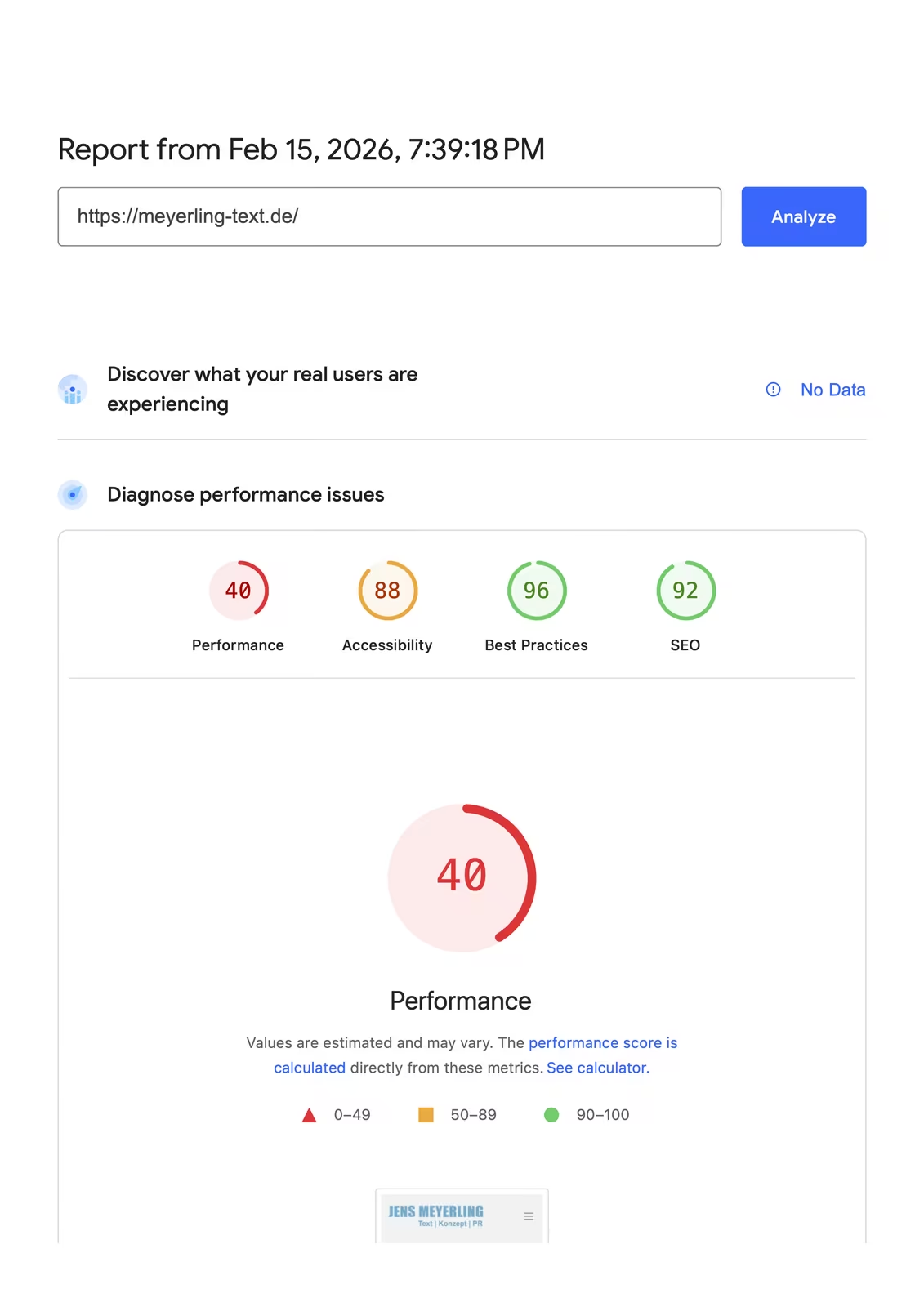
PageSpeed Insights for WordPress (mobile):

PageSpeed Insights for WordPress (mobile)

WordPress, TYPO3 and other content management systems can become slow, insecure and expensive quite quickly. And very often, full-blown content management systems with user management and workflows are not needed.

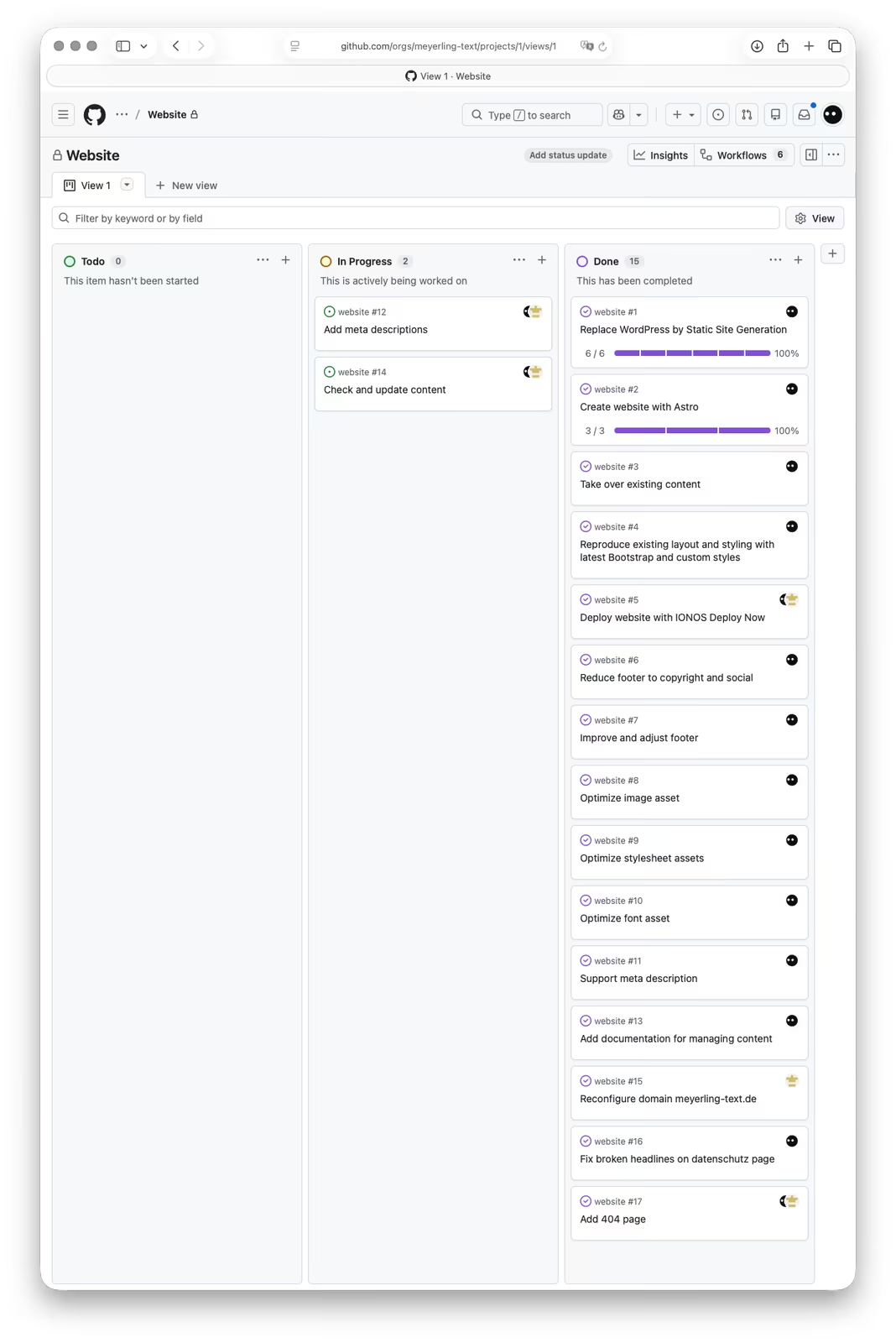
I set up a project on GitHub, and we started working on a rewrite from scratch using Astro with clean, modern HTML and CSS.

GitHub Website Project

The Astro website is using content collections for pages and content blocks and in addition few lines of custom TypeScript code for the navigation.

The content is stored in Markdown files and can be directly authored on GitHub.

On every change (commit) a build (Static Site Generation) is started, and on success the website gets published with IONOS Deploy Now.

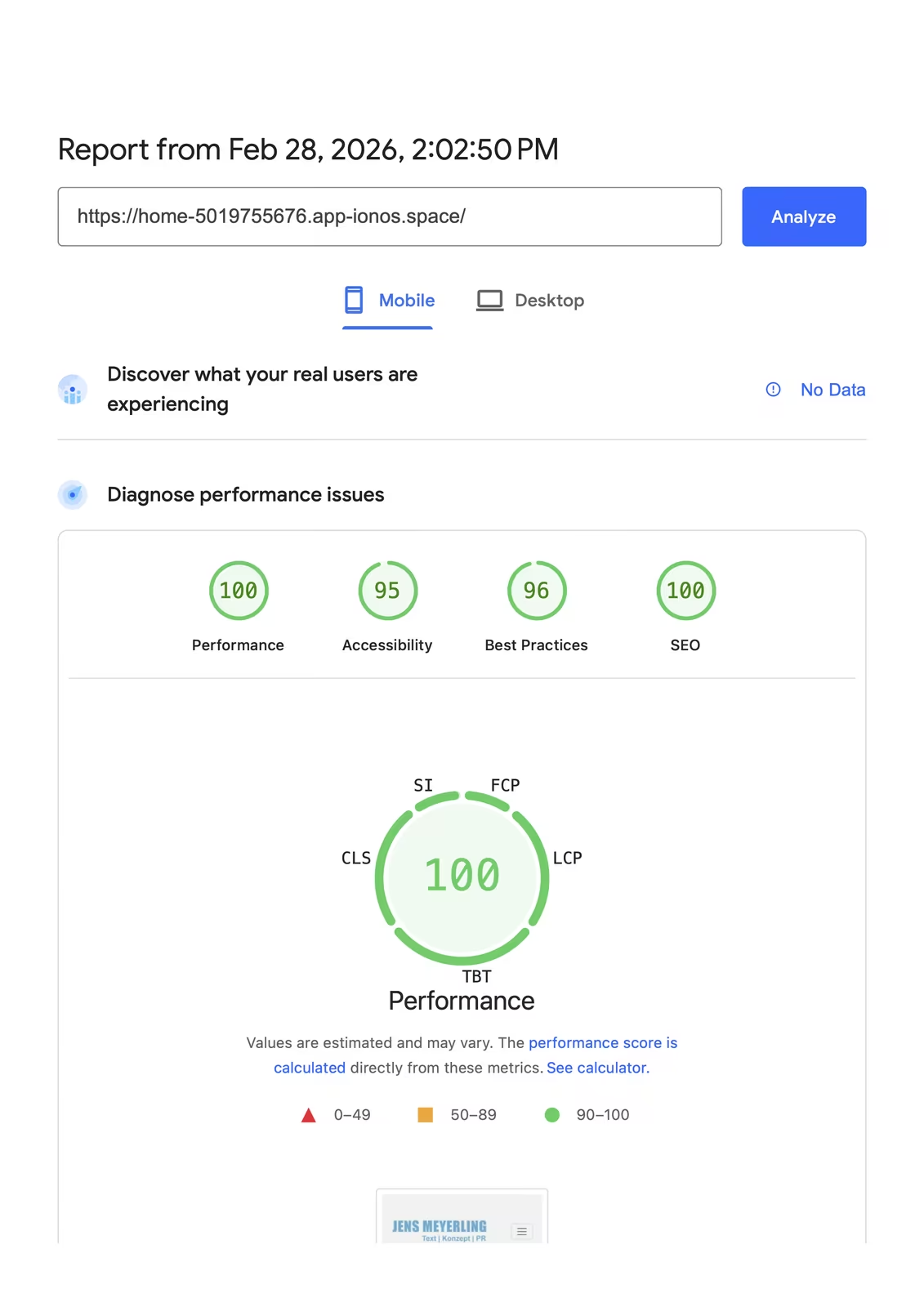
PageSpeed Insights for Astro (mobile):

PageSpeed Insights for Astro (mobile)

WordPress Mobile WordPress Desktop Astro Mobile Astro Desktop
Performance 40 72 100 100
Accessibility 88 91 95 92
Best Practices 96 100 96 100
SEO 92 92 100 100

Static Site Generation allows fast and secure content websites of any scale with inexpensive hosting.

Astro got my attention in 2021 (before the 1.0 release) due to its support for Island Architecture, and I’m a happy user since then. Astro 7.0 was released some days ago with many improvements and new features.

I’m a former Magnolia CMS Committer, Apache Sling PMC member and Architect for Adobe Experience Manager. I do IT for fun and profit.

CSS HTML typescript web Astro

Keyboard shortcuts

Navigation

Home g h
Feed g f
Messages g m
Notifications g n
Your profile g p
Search /

Actions

Write a new post n
Send the post or message you are writing ⌘/Ctrl ↵
Next post in the feed j
Previous post in the feed k

General

Show this help ?
Close menus and dialogs Esc

The single-key shortcuts pause while you type, and are off on phones and tablets.